Voice · Studio + Libraries
Review the words.
Keep the intent.
A review UI for your team. Two typed libraries for your agents and applications. Work in your Git repository, with source files and review records in project folders. Connect the words you see to the file they came from.
Git-backed · Local source files · English and German UI
Choose your entry point
The same review data.
In Studio or your own UI.
Voice Studio · User interface
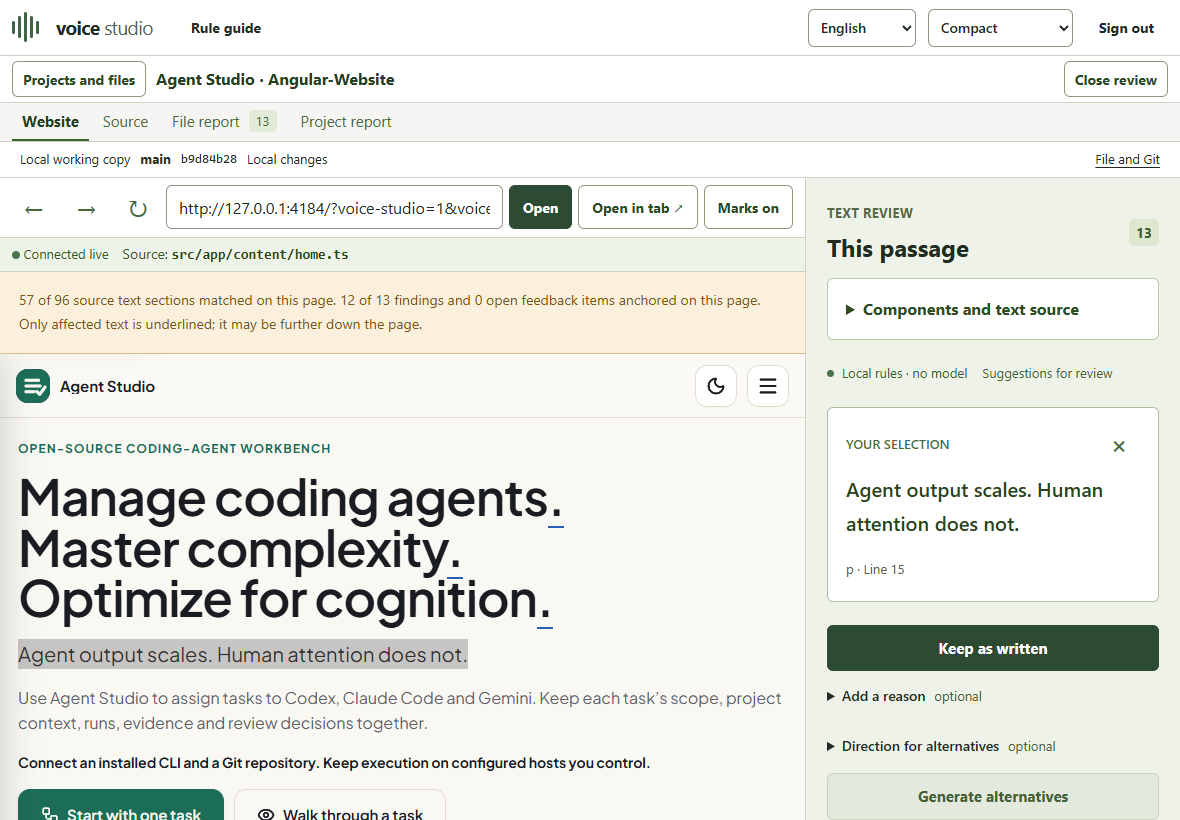
See the page and its source.
Open the local website, review a passage and keep it or compare alternatives. File, source version and optional Git context stay attached to the work.
Agent tools + HTML · Two libraries
Build review into your application.
Use @voice/writing-rules for rule knowledge, review prompts and LLM tools. Use @voice/review to visualize findings in HTML. Both packages support TypeScript and JavaScript with IntelliSense.
import {
  createWritingToolDispatcher,
  writingReviewTools,
} from '@voice/writing-rules/tools';

const dispatcher = createWritingToolDispatcher({
  reviewContext: {
    audience: 'Developers reading the setup guide',
    goal: 'Open a folder and complete a review',
  },
});

// Register these schemas in your model's tool format.
const definitions = writingReviewTools;

// Dispatch a decoded tool call from your agent.
const result = await dispatcher.dispatch({
  name: 'compose_writing_review_prompt',
  arguments: { profile: 'public-docs', language: 'en' },
});
Local tool call · The host registers schemas and runs its model.
Review in your Git repository.
Your source stays in the checkout. Studio shows the branch, commit and local changes, and stores feedback, tasks and decisions under .voice-lint/ in the project. Each proposal refers to a specific source version.
Review the source diff, verify the rendered page and choose the files for your commit. Run records can contain source context and model output; inspect them before sharing.
You can also open a source folder without Git. Source hashes protect reviews when the file changes.
See the file tree and saved JSON ↗From a passage to a decision
- LocateConnect rendered text to its file and version.
- ReviewRead the reason in the page’s context.
- DecideKeep it or choose a proposed change.
- VerifyInspect the diff and the rendered result.
Recognize AI writing anti-patterns.
“Not X, but Y.” Empty importance prefaces. Development history in public documentation. Inspect the patterns, understand their reader cost and use a counter-prompt with your model.
Explore AI writing anti-patterns ↗Read the research: practice articles, studies and libraries ↗
Available from the local workspace
Build the packages in the local checkout and start Studio on your machine. Studio Preview 0.3 supports file reviews: inspect each proposed change before applying it.
Read the docs ↗